 CopyVideoText
How to copy code from a YouTube video
Coding tutorials are full of code you can see but can't select. Instead of pausing and retyping every line, you can copy the code straight out of the video, with its indentation kept.
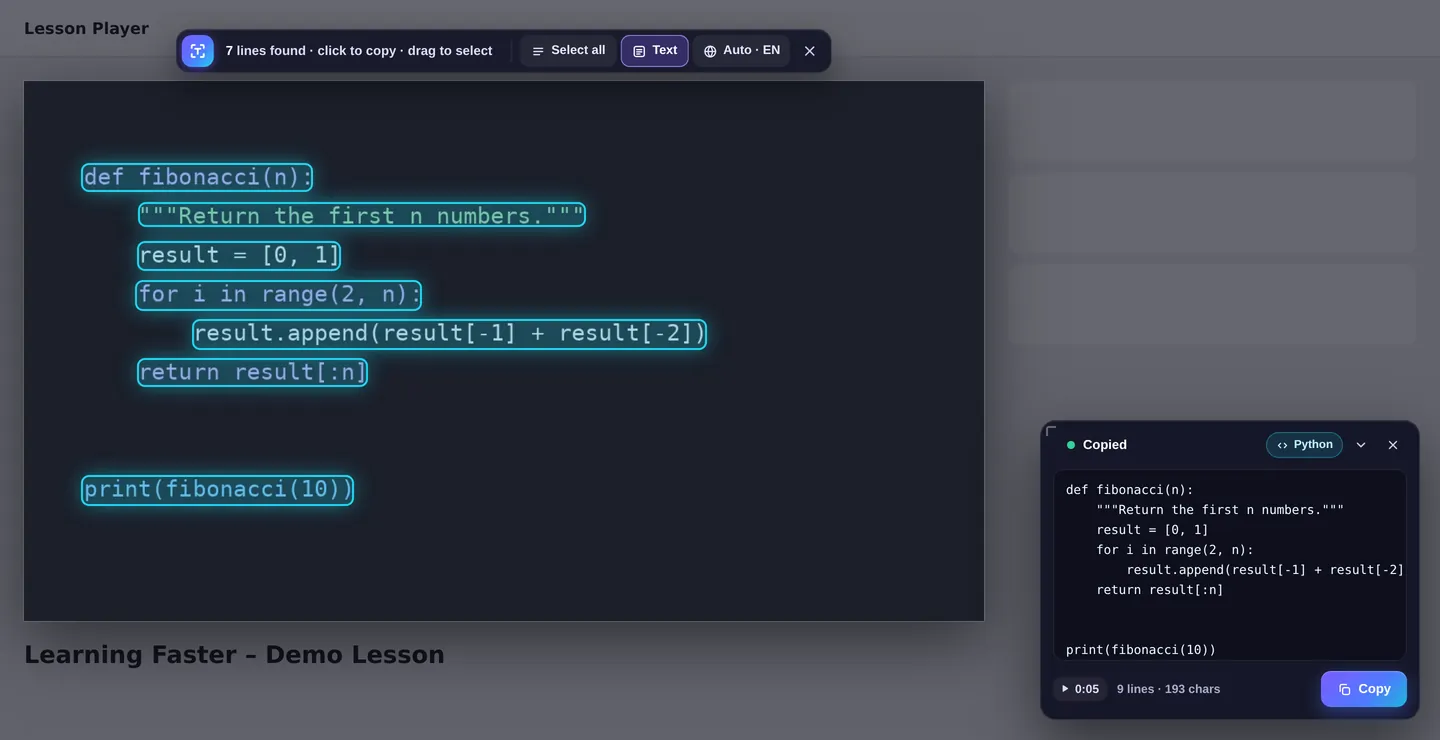
The fast way: copy the code in one click
- Install CopyVideoText from the Chrome Web Store (free).
- Pause on the code in the tutorial, or just press the button while it plays.
- Press “Copy text” in the corner of the video, or use Alt+Shift+C.
- All the code is highlighted and copied. Click a single line to copy only that line, or drag a box around one function.
- Paste it into your editor.
O vs 0 and curly quotes, which break code.Why not just take a screenshot?
A screenshot gives you a picture, not code. You still have to type it again, which is slow and leads to typos, especially with brackets, quotes and indentation in languages like Python where spacing matters. Copying the text directly saves time and avoids those bugs.
Tips for the best results
- Use the highest video quality (1080p or more). Sharper text means more accurate code.
- Make the player bigger or use theater mode before copying.
- Pause on a still frame where the code isn't scrolling.
- If one line comes out wrong, drag a box around that part to read it again more closely.
- Code in dark editor themes works well: light text on a dark background is handled automatically.
Which languages are supported?
Any programming language shown on screen can be copied. Code Mode recognizes Python, JavaScript, TypeScript, HTML, CSS, SQL, Java, C#, C/C++, PHP, Go, Rust and shell commands, and labels the copy so you know what you've got.
Frequently asked questions
Does it keep the indentation?
Yes. Code Mode measures where each line starts and rebuilds the spaces, snapping to 2 or 4 spaces when the code uses them.
Can I copy just one function?
Yes. Drag a box around the function, or click the lines you want one by one.
Does it work on other sites besides YouTube?
Yes. It works on most video sites, including online course platforms and videos embedded in blogs and documentation.
Is my code uploaded anywhere?
No. The text is recognized on your own computer and never leaves your browser.